MySQL logo MySQL · 5.7 → 8.4 · RDS · Aurora · Cloud SQL · Azure

The MySQL backup tool that

Point SQLBackup at MySQL and it handles the rest — native mysqldump with --single-transaction for a consistent InnoDB snapshot, streaming gzip, client-side AES-256 encryption, and shipping offsite to S3, SFTP or local storage on a schedule. Then restore any database with mysql in minutes.

99.9%
Backup success
5 min
Typical restore
256-bit
AES-GCM
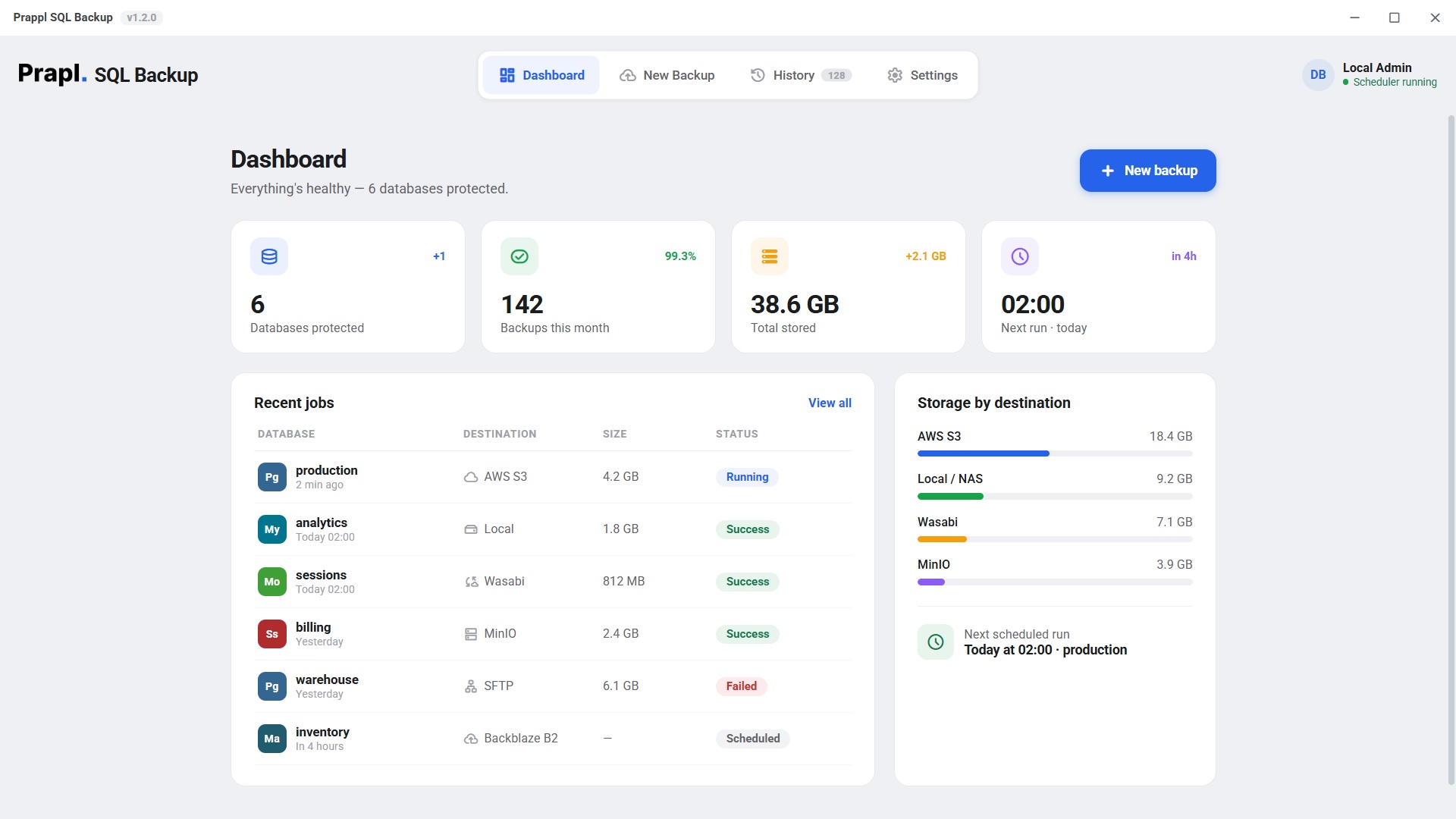
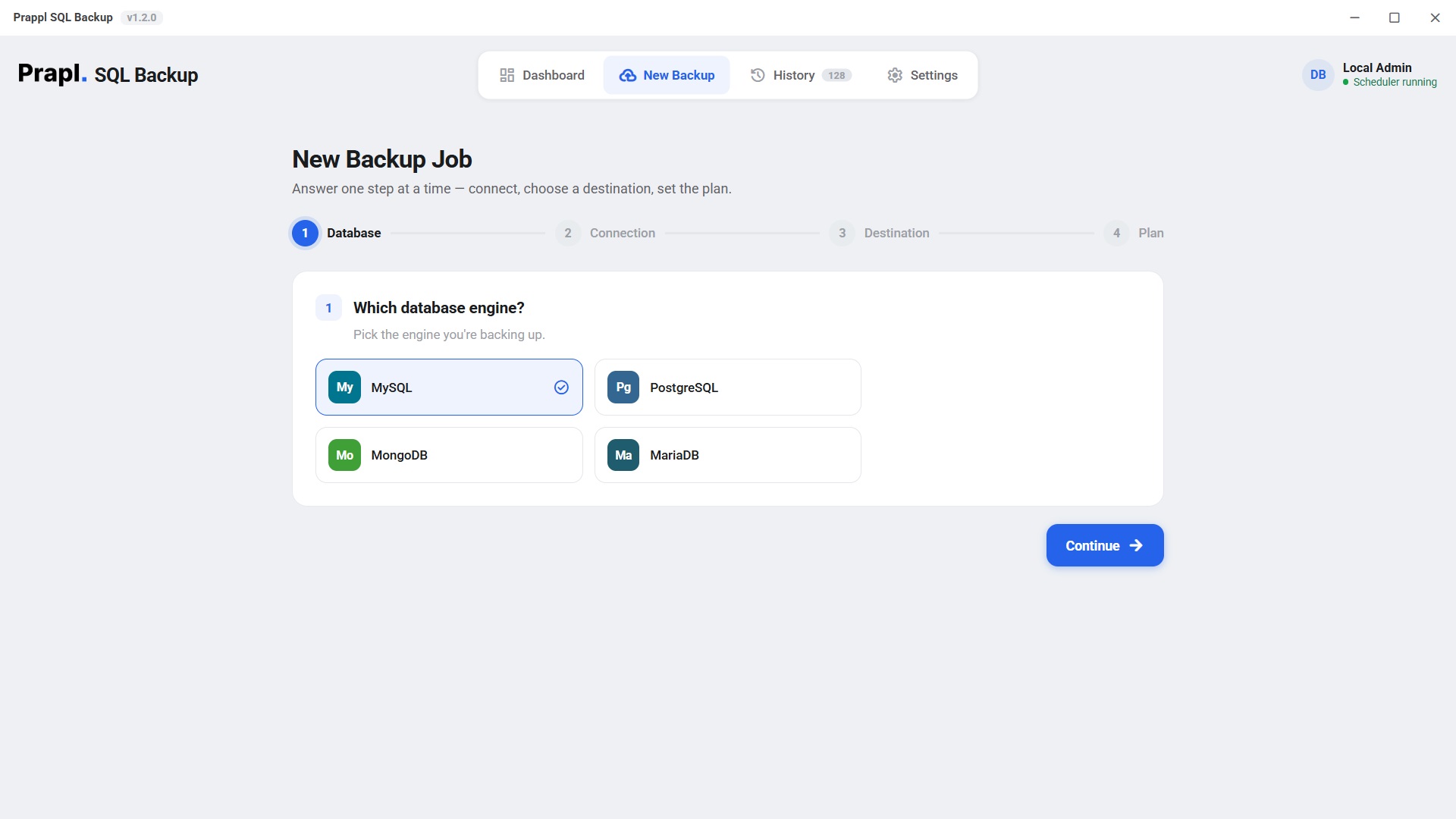
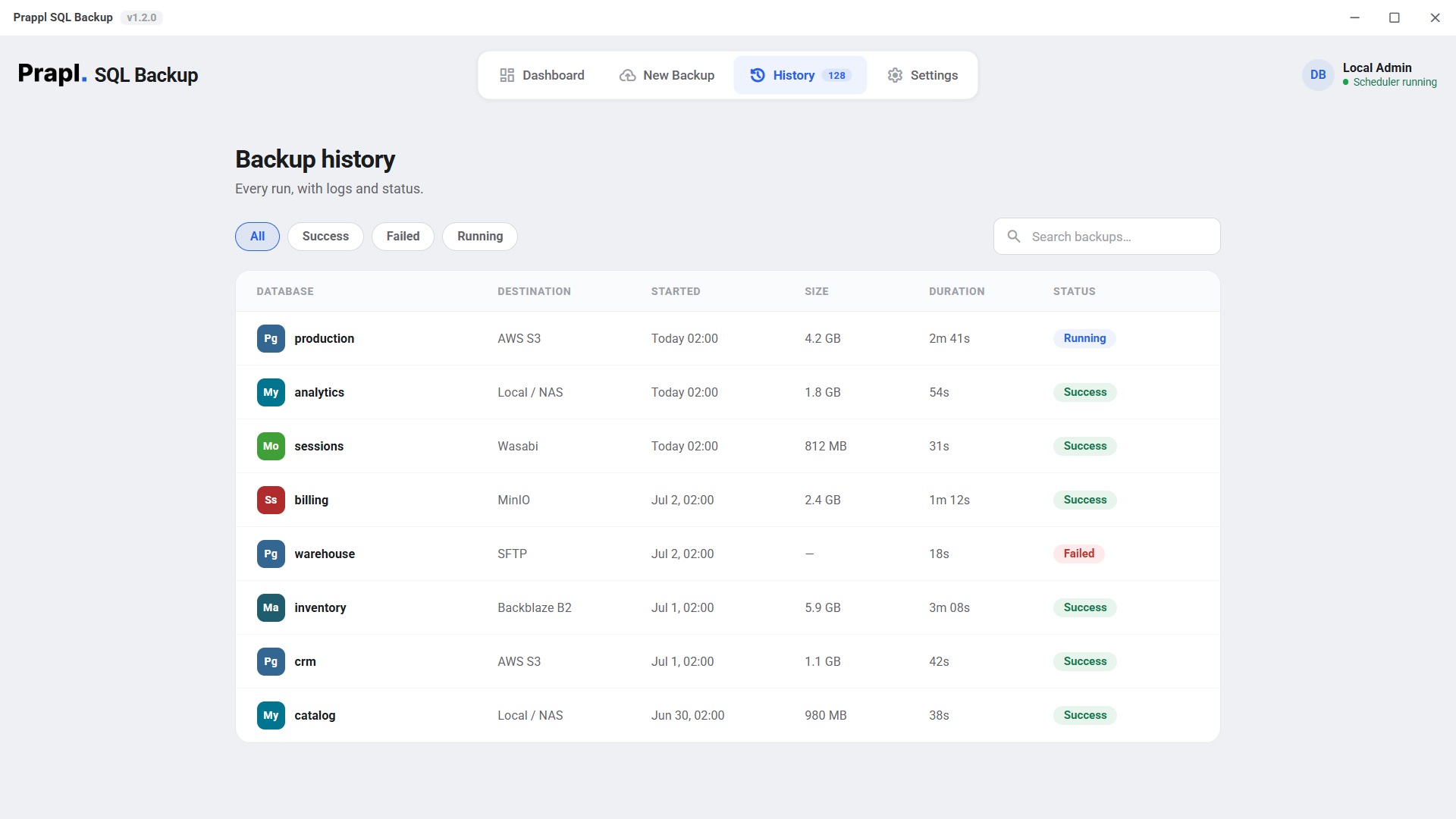
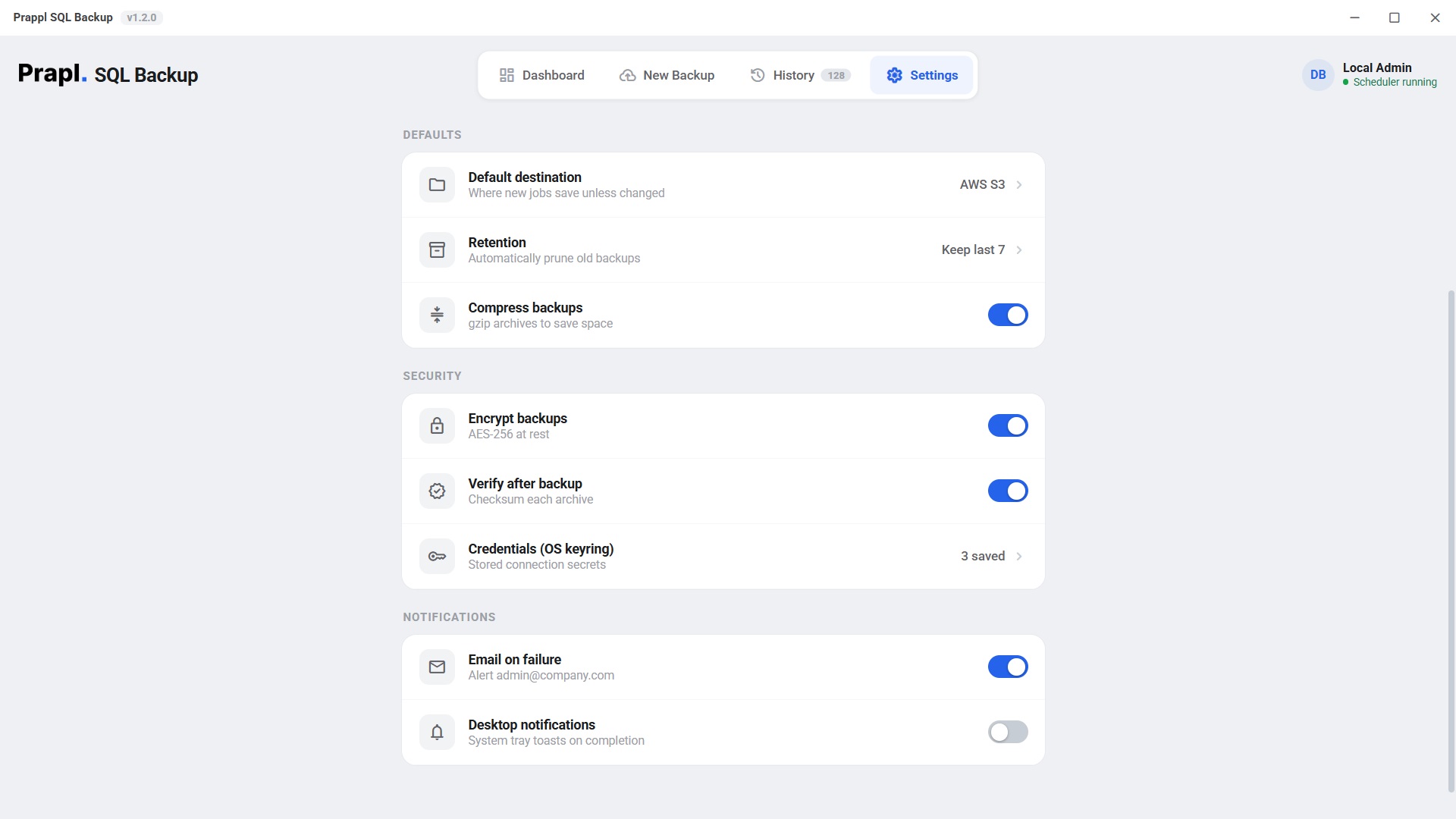
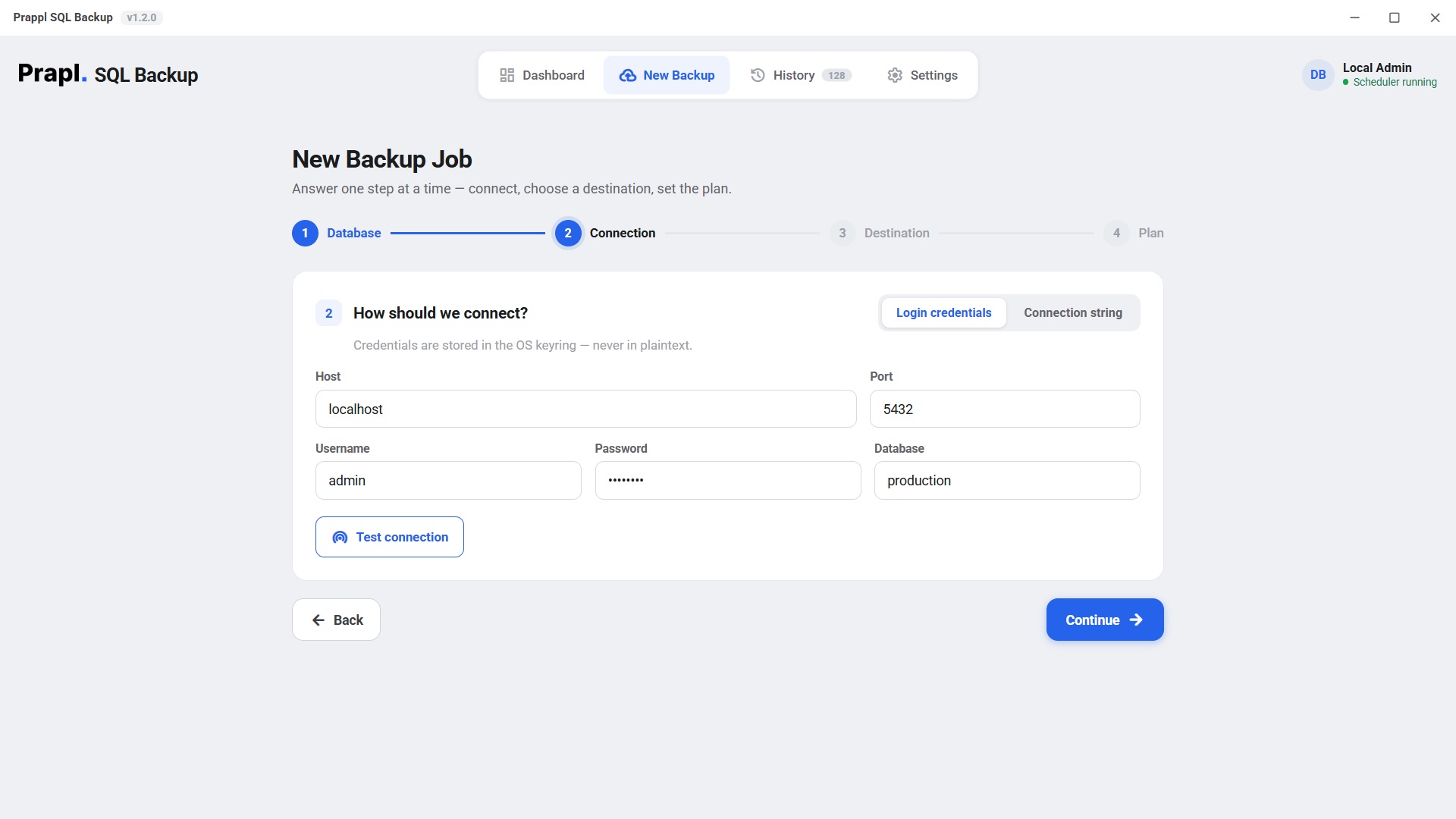
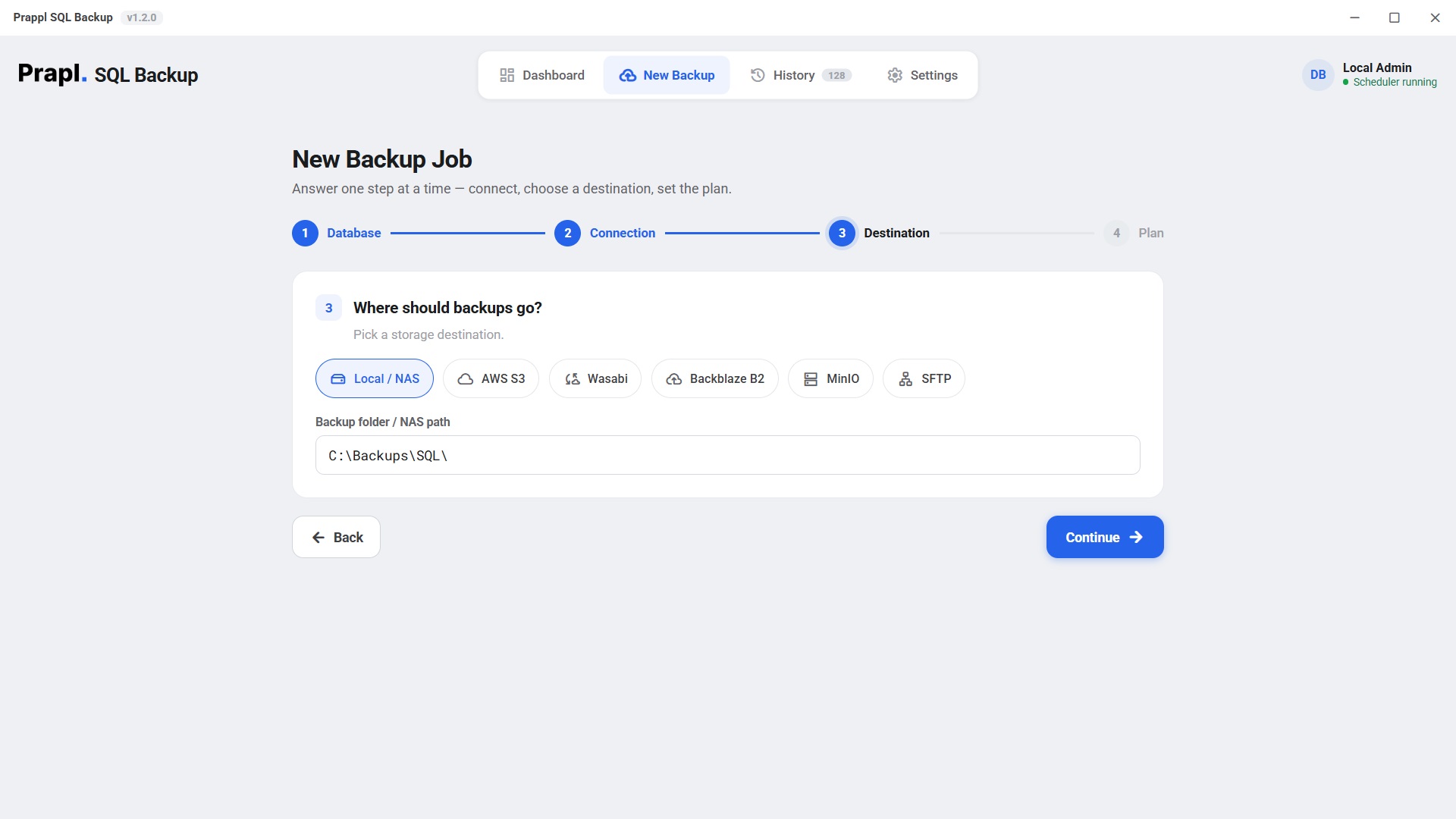
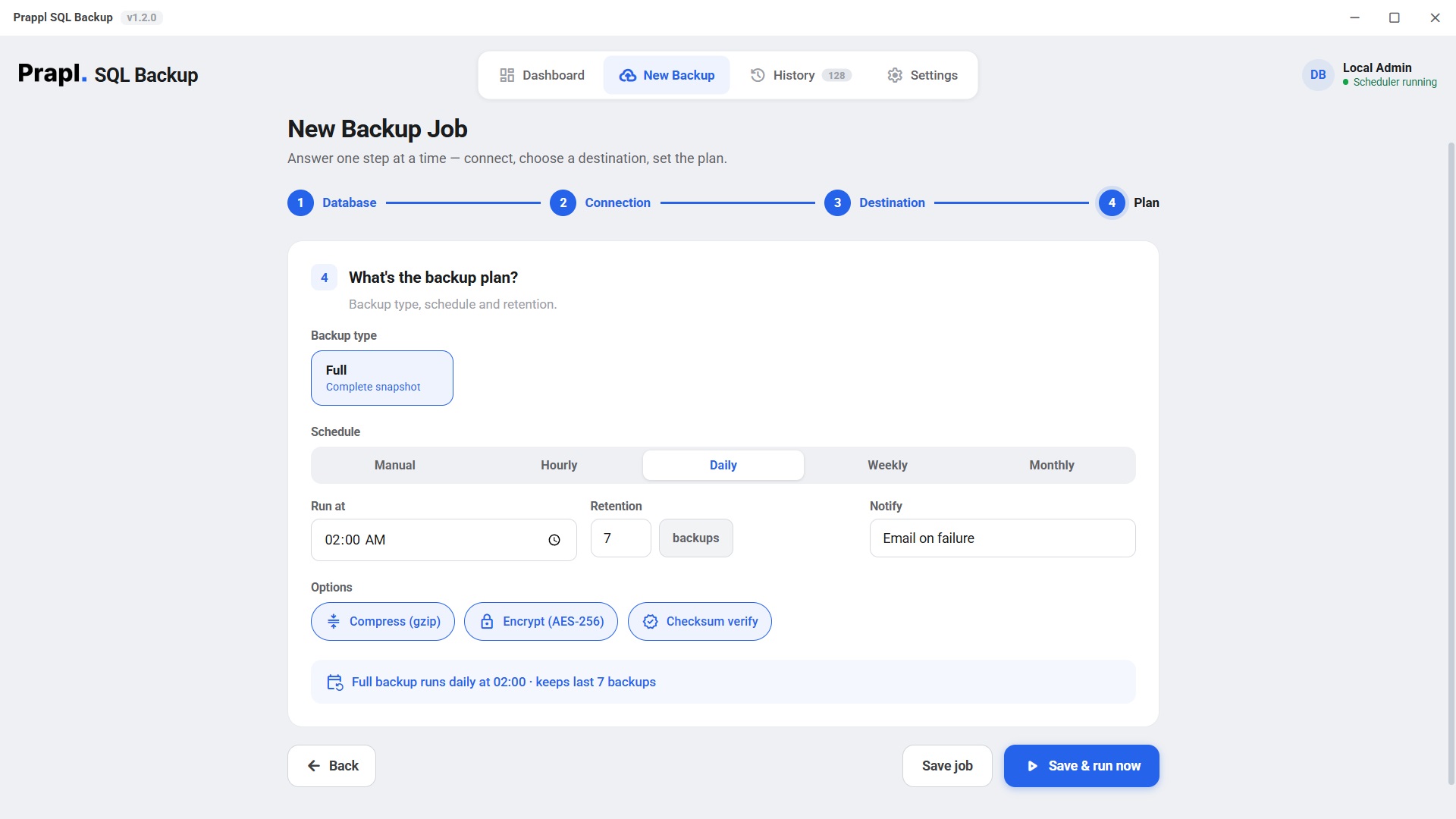
SQLBackup dashboard showing databases protected, backups this month and storage by destination New Backup wizard step 1 — choosing the MySQL database engine Backup history screen listing every run with size, duration and status Settings screen with encryption, verify-after-backup and OS keyring credential options
analytics · backed up 2 min ago
mysqldump/ --single-transaction/ streaming gzip/ AES-256-GCM/ Amazon S3/ SFTP/ cron schedules/ mysql restore/
5.78.4
MySQL versions
6
Storage destinations
256-bit
AES-GCM encryption
1 cmd
To fully restore
Why a dedicated tool

A cron job running mysql isn't a backup strategy

It breaks silently after a version upgrade, leaves plaintext dumps on disk, and nobody ever tests the restore. SQLBackup fixes all three — and keeps a record that it did.

Every MySQL, one workflow

Self-hosted, Amazon RDS, Aurora MySQL, Google Cloud SQL, Azure, PlanetScale, or a container — SQLBackup uses MySQL's own mysqldump with --single-transaction, so InnoDB stays consistent without locking writes. Portable .sql, ready to restore anywhere.

  • MySQL 5.7 · 8.0 · 8.4
  • RDS · Aurora · Cloud SQL · Azure
  • routines · triggers · events
  • SSL / TLS aware

Encrypted before it leaves the box

Backups are compressed and encrypted with authenticated AES-256-GCM on your machine. Your S3 bucket or SFTP host only ever stores ciphertext — and a tampered dump fails loudly on restore instead of corrupting production.

  • scrypt-derived key
  • per-chunk nonce
  • secrets in OS keyring
  • checksum verified

Scheduled & monitored

A cron scheduler runs every job on time and records the result in a history log — with email alerts the moment one fails.

Offsite, in many places

Send each dump to local/NAS, Amazon S3, Wasabi, Backblaze B2, MinIO and SFTP at once, each with its own retention window.

Restore you can trust

One command downloads, decrypts, decompresses and mysqls into a fresh database — so you verify before you promote.

How to use it

Set up an encrypted MySQL backup in four screens

Real screenshots from the app — click a step to see it. The New Backup wizard asks one question at a time, so you never have to know MySQL internals to get a safe, offsite backup.

Works everywhere MySQL runs

Pick where your database lives

Managed or self-hosted, SQLBackup connects the right way — including the fiddly bits like SSL and cluster topology.

Self-hosted Amazon RDS Aurora MySQL Cloud SQL PlanetScale Docker
Inside one backup

Watch a MySQL backup ride the pipeline

Every backup streams through four stages — nothing is ever fully loaded into memory. Click a stage to dig in.

1 · mysqldump
native tool
2 · Compress
streaming gzip
3 · Encrypt
AES-256-GCM
4 · Ship
S3 · SFTP · local
The part that matters

A backup you can't restore is just wasted disk

With SQLBackup, recovering a MySQL database is one command — download, decrypt, verify, decompress, and mysql into a fresh database. Press play to watch every step.

# restore the latest analytics backup from S3 sqlbackup restore --job mysql_nightly_full \ --from amazon_s3 --database analytics_restored

Tip: schedule a monthly test restore — an untested backup isn't a backup yet.

Restore: analytics from Amazon S3
Locate backupfind the key in the destination
Downloadpull the encrypted object · 612 MB
Decrypt & verifyAES-256-GCM integrity check
Decompressrestore the original dump · 2.41 GB
mysql restorerebuild into analytics_restored
sqlbackup · encrypt · analytics
Plaintextanalytics_full_20260627.dump.gz
scrypt(password, salt) → 256-bit key · fresh nonce
Ciphertext
FormatMAGIC(9) · SALT(16) · [ LEN · NONCE(12) · CT+TAG ] × N
256-bitAES key
96-bitnonce / chunk
64 KBchunk size
Security

Your MySQL data leaves encrypted — or not at all

scrypt key derivation

Your password becomes a 256-bit key via scrypt with a random per-file salt — slow to brute-force by design.

Per-chunk authentication

GCM tags mean a corrupted or altered dump fails to decrypt — loudly — instead of restoring garbage into production.

Secrets in the OS keyring

Connection passwords live in Windows Credential Manager or the Linux Secret Service — never in a plaintext config file.

No middleman

No account, no phone-home. Backups go straight from your machine to your storage. We never see your data or your keys.

Read the security model
How it compares

SQLBackup vs a DIY cron job vs cloud snapshots

The honest trade-offs. SQLBackup is built for scheduled, encrypted, portable logical backups you actually control.

CapabilitySQLBackupDIY mysqldump + cronManaged cloud snapshots
Automatic scheduling Built-in cronManual crontab Provider default
Client-side AES-256 encryption Always Plaintext dumpsAt rest, provider-held keys
Offsite to your own storage S3 · SFTP · NASScripts you maintainLocked to provider
Portable — restore anywhere Standard mysql mysql Same provider only
Failure alerts & history Email + log Fails silentlyBasic console
You hold the keys Always
Cost$5/mo, flatYour timeStorage + egress
Why trust it with your database

Built by engineers who've restored MySQL under pressure

The SQLBackup team

Database & backend engineers · makers of SQLBackup

We built SQLBackup after living the nightmare ourselves: a production MySQL database wiped by a bad deploy, and a "nightly backup" that had been failing silently for weeks. Every default in this tool — native dumps, encryption on, verify-after-backup, tested restores, failure alerts — comes from a lesson we learned the hard way so you don't have to.

Native MySQL tooling AES-256-GCM · scrypt Documented backup format

Experience

Forged from real 3 a.m. restores, not a spec sheet. The workflow mirrors how experienced engineers actually recover MySQL.

Battle-tested defaults

Expertise

Uses MySQL's official tooling and audited cryptography (AES-256-GCM, scrypt) — plus real edge-case handling like SSL and cluster topology.

Native tools · audited crypto

Authoritativeness

An openly documented backup format and standard mysql output mean your data is never trapped in a black box — restore it anywhere.

Documented · no lock-in

Trustworthiness

No telemetry, no account for your data, no master key. Backups go straight from your machine to your storage — and pricing is one honest flat rate.

No phone-home · you keep the keys

Sources & further reading

SQLBackup builds directly on MySQL's own, documented tools. Verify our approach against the official docs:

Loved by MySQL teams

Teams that stopped worrying about backups

From solo founders to platform teams — here's what people say after switching to SQLBackup.

Sample testimonials shown for layout — replace with your own verified customer quotes before launch.

Who it's for

MySQL backups that fit how you work

🚀

SaaS & startups

Protect the production database without hiring a DBA. Nightly encrypted dumps to S3, with an email the moment one fails.

🏢

Agencies

Give every client a tidy, encrypted, offsite MySQL backup — and restore any of them to a new server in minutes.

🛡️

Compliance-minded teams

Encryption at rest by default, retention you control, and a clear, tested restore path auditors like to see.

🧪

Dev & data teams

Grab a consistent snapshot to spin up staging or run analysis — restore a production dump into a throwaway database safely.

☁️

Managed / cloud users

Own a portable copy of your managed MySQL that isn't locked to one provider — restore it anywhere mysql runs.

🏠

Self-hosters

Back up your self-hosted apps' database to a NAS and a cheap cloud bucket. No subscription lock-in, no telemetry.

Technical specs

What's under the hood

Backup engine
mysqldump --single-transaction --routines --triggers --events · MySQL Shell util.dumpInstance for large, parallel dumps
Restore
mysql dbname < dump.sql (or mysqlsh util.loadDump for instance dumps)
Versions
MySQL 5.7, 8.0 & 8.4 LTS · ships up-to-date client tools · version-aware dumps
Managed support
Amazon RDS & Aurora MySQL, Google Cloud SQL, Azure Database for MySQL, PlanetScale · TLS endpoints
Compression
Streaming gzip — constant memory, no temp bloat
Encryption
AES-256-GCM, key via scrypt, per-file salt, per-chunk nonce · secrets in OS keyring
Destinations
Local / NAS, Amazon S3, S3-compatible (Wasabi, Backblaze B2, MinIO), SFTP
Scheduling & retention
Manual / hourly / daily / weekly / monthly · keep-last-N per destination
Platforms
Windows 10/11 & Linux · desktop app and headless CLI/agent
MySQL backup FAQ

Questions, answered

Yes. SQLBackup runs MySQL's own mysqldump with --single-transaction (plus --routines --triggers --events) so InnoDB tables get a consistent snapshot without locking writes. For very large databases it can use MySQL Shell's parallel util.dumpInstance instead. Restores use the standard mysql client.

MySQL 5.7, 8.0 and 8.4 LTS. The app ships matching client tools so a version bump on the server never silently breaks your backups.

Yes. It connects to RDS for MySQL, Aurora MySQL, Google Cloud SQL, Azure Database for MySQL and PlanetScale over TLS, using a normal user with the privileges mysqldump needs. Point it at the endpoint and it dumps just like a local server.

Yes. The same app backs up MySQL, PostgreSQL, MariaDB and MongoDB — each with its own native dump tool — so one tool and one flat price covers every database on the machine.

Backups are encrypted client-side with authenticated AES-256-GCM before anything leaves your machine — the key is derived with scrypt and a random per-file salt. Connection secrets live in the OS keyring (Windows Credential Manager / Linux Secret Service), never in a plaintext config file.

Yes. With checksum verification enabled, each archive is hashed and checked after it's written, and the AES-256-GCM tag proves integrity again on restore — a corrupted or tampered dump fails loudly instead of restoring garbage.

SQLBackup takes full logical dumps with mysqldump on a schedule, not continuous binlog-based PITR. That gives you fast, portable whole-database restores for daily protection; if you need point-in-time recovery, keep binary logging on alongside it.

$5/month, billed annually as a single $60 payment — one plan, every feature, unlimited databases. Try it free for 15 days (no credit card), backed by a 14-day money-back guarantee, with no auto-renewal. See the pricing page.
One tool, every database

Also backs up your other databases

One flat price covers every engine on the machine. Explore the others:

Back up MySQL tonight

Try every feature free for 15 days — no card, no charge. Keep it for $5/month, billed annually, with a 14-day money-back guarantee on your purchase.

15-day free trial 14-day money-back No auto-renewal